Managing Team Members
WMS Biz utilizes a Role-Based Access Control (RBAC) system. By default, the person who registers the company account is granted the ADMIN role.
Inviting Users
As an Admin, you can invite your staff to join the environment:
- Navigate to Settings > User Management.
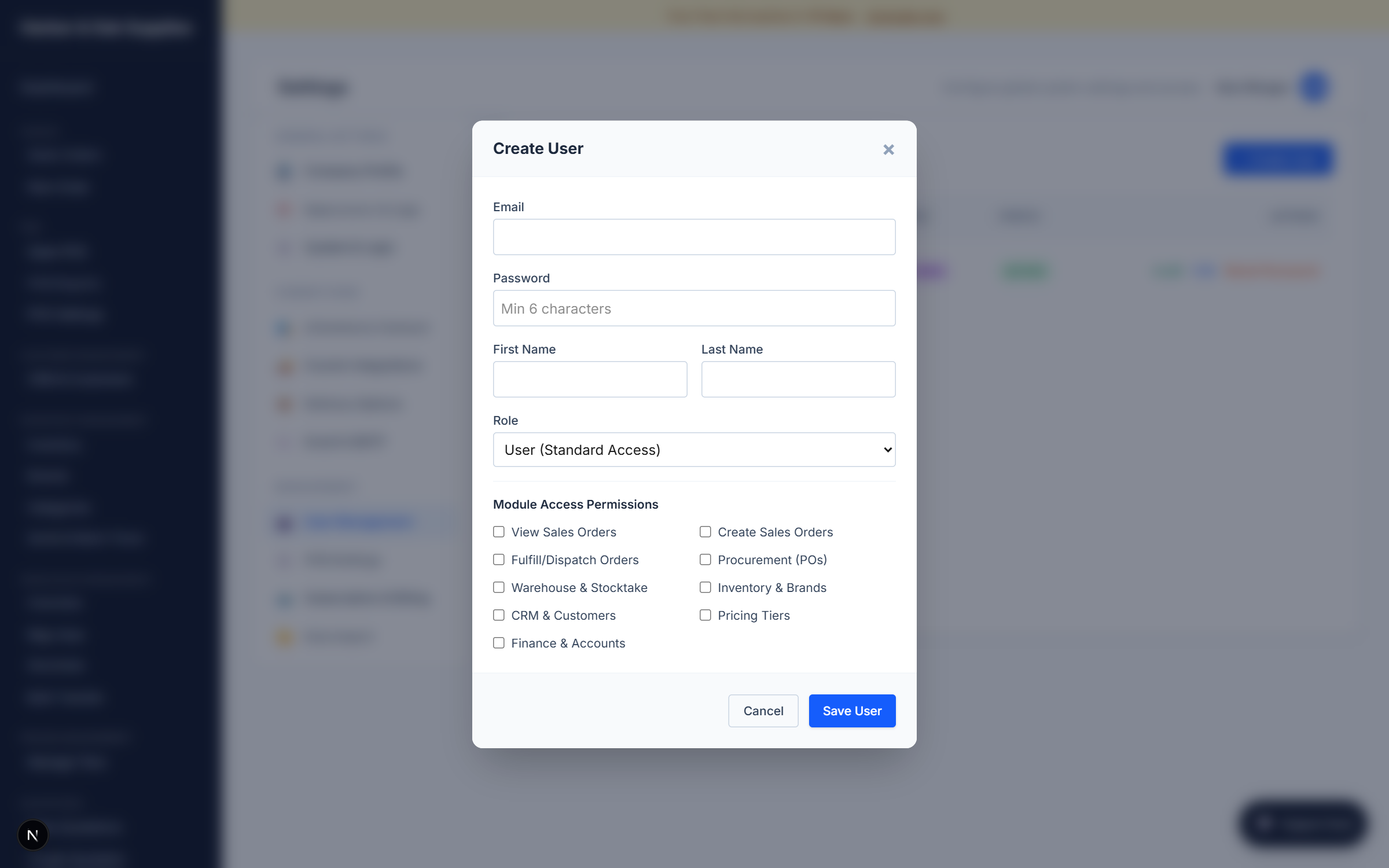
- Click + Create User.
- Enter their name and email, and assign them a temporary password.
- Set their Role to
USER.
Granular Permissions
If a team member is assigned the USER role, you must explicitly grant them access to specific modules of the ERP using the toggles:
- CRM: Can view and edit customer records.
- Finance: Can view invoices, billing, and cost reports.
- Inventory: Can view SKUs and stock levels.
- Warehouse: Can execute stock movements and adjustments.
- Sales View: Can view Sales Orders but not create them.
- Sales Create: Can build new quotes and confirm orders.
- Sales Fulfill: Can access the Pick & Pack dashboards to ship orders.
- Procurement: Can create Purchase Orders for suppliers.
By restricting access, you ensure that a warehouse picker cannot accidentally view financial data or alter product pricing.